A daily journal for your research data.

Log what you changed, see your history, and stay archive-ready—all on your own computer.

FreeNo accountNo cloudRuns locallyLocal AI ready
Sound familiar?

Every dataset tells a story.
Most of it gets lost.

Without SepiaLog

final_data.xlsx
final_data_v2.xlsx
final_data_v2_FINAL.xlsx
final_data_v2_FINAL_really.xlsx
data_NEW_use_this_one.xlsx

…two years later, a reviewer asks which one produced Table 3.

With SepiaLog

Mar 03Imported raw household panel survey (2 waves). #raw
Mar 14Dropped the data for 2014 because the sampling frame changed. #cleaning
Apr 02Merged price data; Table 3 produced from v14. #analysis
archive-package.zip · README + DMP + checksums
How it works

Three small habits, one tidy archive

No migration, no setup ritual. Point it at a folder and start writing. The documentation assembles itself in the background.

STEP 01

Open a project folder

Open or create a project folder on your computer. That folder is your journal, no import, no upload.

STEP 02

Write a quick note

Each time you work with the data, leave a short memo of what changed and why. A sentence is plenty.

STEP 03

Generate when you need it

Produce summaries, data management plans, and an archive-ready package whenever the moment calls for it.

Watch the demo

Up and running in one minute

Install the app, open it, and create your first project. Real footage with narration.

sepialog · how to start in one minute

More tutorials on YouTube.

What you get

Capture. Understand. Deliver.

Ten features, three promises. The small notes you take today become the documentation your future self needs.

01 · Capture

One sentence a day. That's the whole habit.

Write a quick note whenever you touch your data: type it, dictate it by voice, or use the floating Quick Log without leaving Excel, Word, Numbers or Pages. Streaks and a heatmap keep it fun.

Everything in Capture
  • Daily memos: short typed notes with #hashtags
  • Voice dictationPro: speak your memo and it is transcribed on your computer
  • Quick LogPro: a floating mini-window that works inside Excel, Word, Numbers and Pages
  • Mobile capturePro: save ideas on your phone, even offline, and file them to the right project later (get the app)
  • Streaks & heatmap: a gentle nudge that turns logging into a habit
quick log · works in every app
SepiaLog Quick Log, a small floating window for logging a change, with hashtags and voice input
02 · Understand

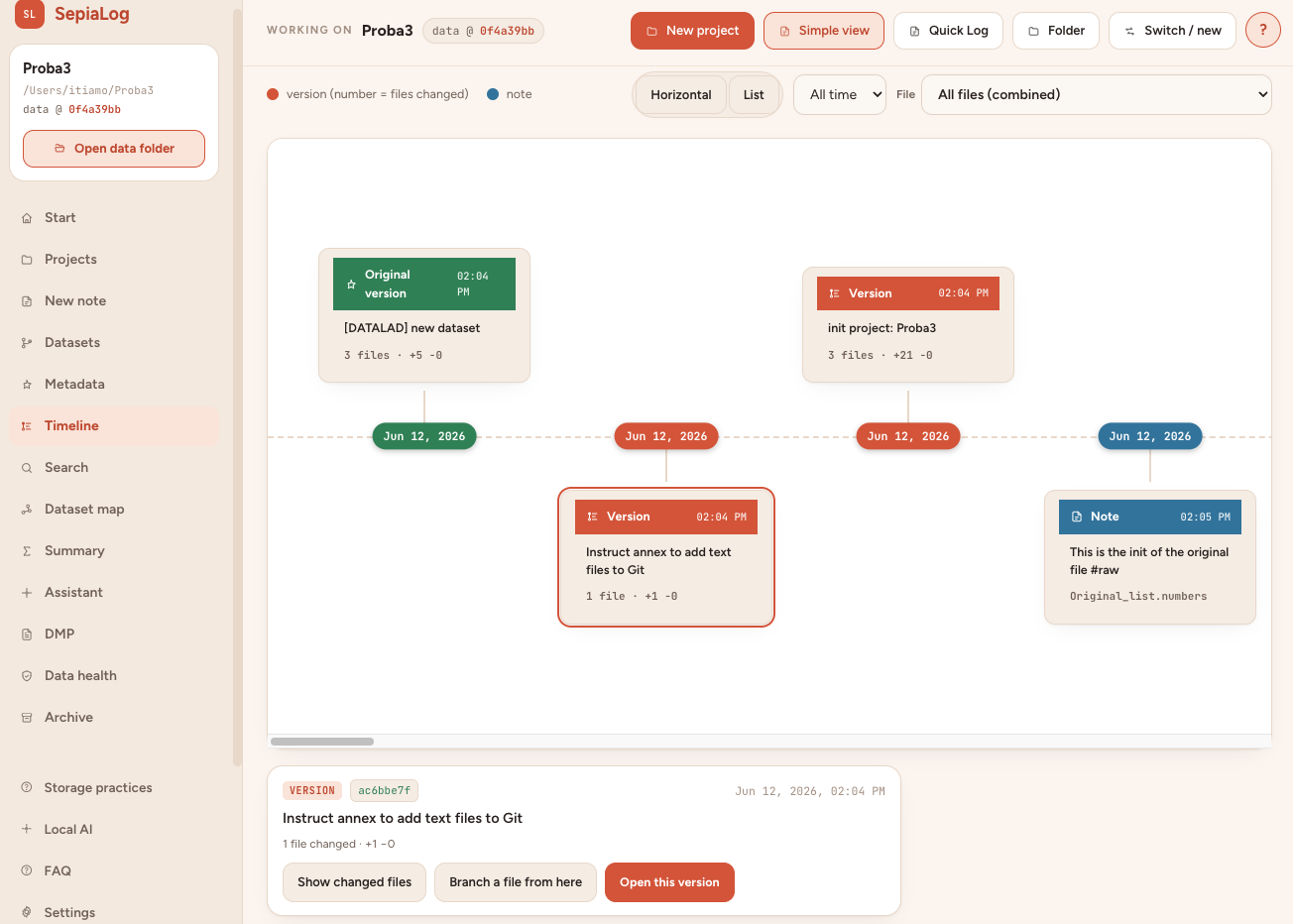
Your dataset's whole story, on one timeline

Every version from “Original” to now, every note in its place. Reopen the data exactly as it was at any point, or ask the local AI: “Why did I drop the data for 2014?”

Everything in Understand
  • Visual timeline: versions and notes on one axis; reopen any state of your data
  • Built-in version history: works the moment you install, files never locked (optional Git/DataLad for power users)
  • Local, private AIPro: “Ask my dataset” answers from your notes, files and history; drafts READMEs and methods paragraphs
  • Cross-project dashboard: all datasets in one view, every note searchable
  • Script→data map: see which analysis produced which file
  • “Since our last meeting”: a one-click update for supervisors and teams
timeline · every version, every note
SepiaLog visual timeline showing dataset versions and notes from the original version to now
03 · Deliver

Archive-ready in one click

When the moment comes (publication, thesis submission, project end), SepiaLog turns your journal into the package everyone asks for. No weekend lost to “data cleanup”.

Everything in Deliver
  • Archive package: checksummed ZIP with README and metadata
  • Repository profilesPro: tailored exports (e.g. Zenodo) with citation file and submission checklist
  • Data management plans: export as Word, PDF or machine-actionable maDMP for RDM systems
  • FAIR scorePro: live readiness score with concrete next steps
  • GDPR checkPro: screens for personal data before you share
  • Guided metadata & codebook: a wizard documents every variable; smart autocompletePro suggests entries from your files
  • Publication modePro: pins the exact dataset version behind each paper or chapter

Also: a multi-language interface (English, German, 简体中文), and a built-in demo project so you can try everything before using your own data.

The core app is free. Tools marked Pro are optional extras, currently free for everyone during the beta.

Get started for free
Who it's for

Built for the way you work

For PhD students

Save weeks of cleanup later

A one-sentence memo today saves you a week in year three. You will always know which file is final, and why you dropped the data for 2014.

Start journaling
For supervisors & PIs

See what changed in one click

Get a clean summary of what changed in the data since the last meeting. When reviewers ask for revisions two years later, the exact dataset version is pinned to the paper.

Try it with one student
For data stewards & RDM offices

A tool students actually use

It quietly produces the FAIR, archive-ready package you ask them for, with maDMP export and a GDPR check. Local and no-cloud, so data-protection review is easy.

Evaluate for your trainings
About

Why SepiaLog exists

SepiaLog was created by Dr. Ivan Đurić, a Senior Researcher. He built it out of a need that grew from more than 20 years of research experience.

Keeping up with the constant transformations a dataset goes through over a project's lifetime is a never-ending struggle. And when the motivation to track that processing slips, as it always does, it turns into real problems later, the moment results need to be regenerated or the data prepared for publication.

SepiaLog exists to fix exactly that: to help PhD students and researchers turn one of the most tedious and demanding parts of research into something genuinely easy.

Enjoy journaling.

Your future self will thank you

Download SepiaLog
Free (some Pro features optional) No account No cloud Runs on your computer Local AI ready